How to enable push notifications in the Brakar app
Yes, you can! You can subscribe to traffic updates for your favorite routes directly in the Brakar app. You will receive push notifications for major delays, cancellations, or other service disruptions. You can choose exactly which route(s) you want to receive alerts for.
How to set up your notifications:
Update the app: Start by ensuring you have the latest version of the Brakar app installed.
Check phone settings: Make sure you have allowed notifications for the app in your phone's system settings.
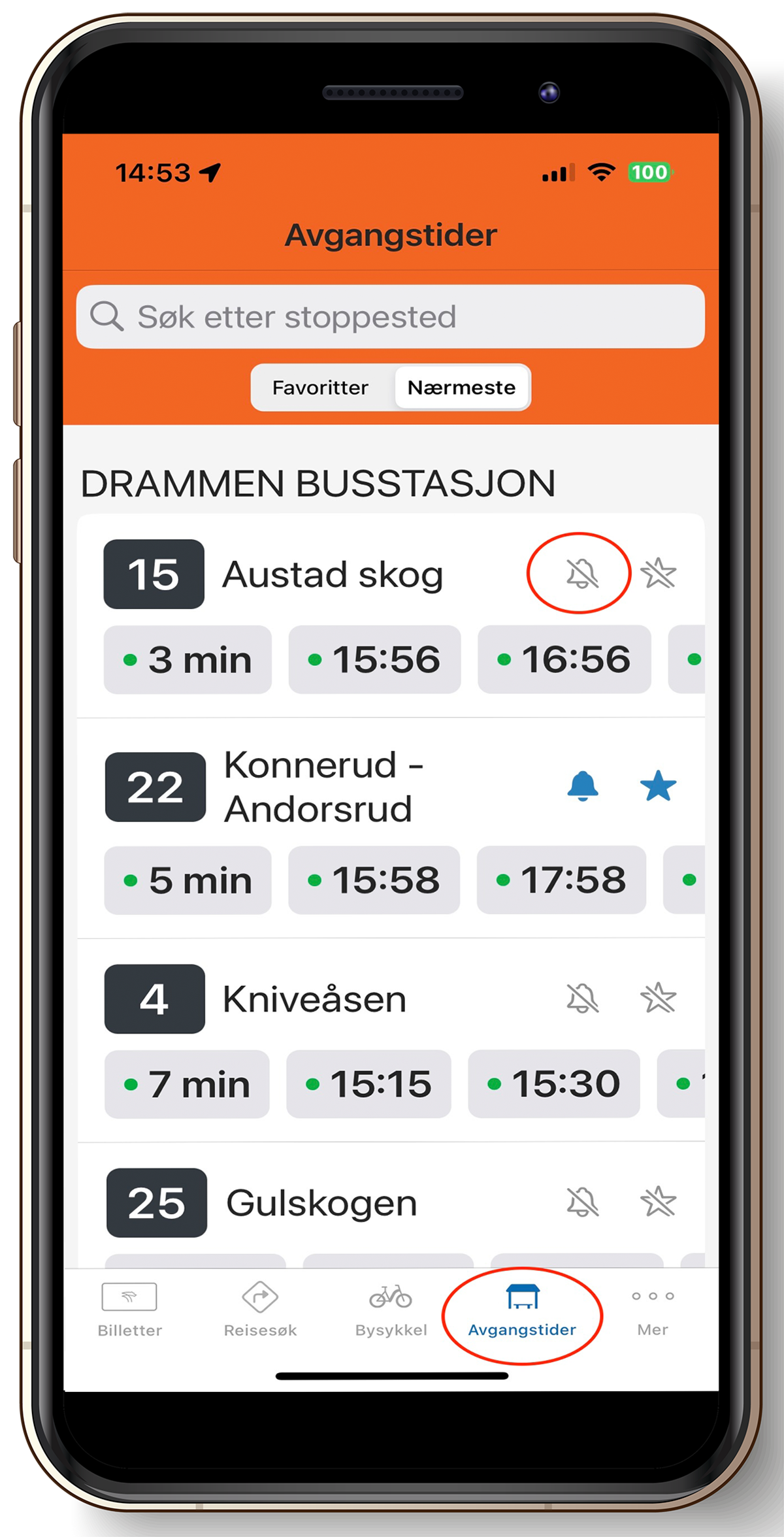
Go to Departures: Open the app and tap Departures (Avganger) in the bottom menu.
Find your stop: Locate the stop you travel from. You can find it via "Favorites," "Nearby," or by using the search bar.
Subscribe: Once you have selected a stop, all routes serving that stop will appear. Tap the small bell icon next to the route number to subscribe to alerts. To turn notifications off, simply tap the bell icon again.
Need help? If you have any questions, please contact us by phone at 177.